A 42-second promo film without opening an editor: shooting a moving map frame by frame
I made a 42-second film for Find My Pet without ever opening an editor or recording the screen: every frame was computed. Here is how, including the six versions that were wrong.
2026-08-31 作者 William Hsu
The result first
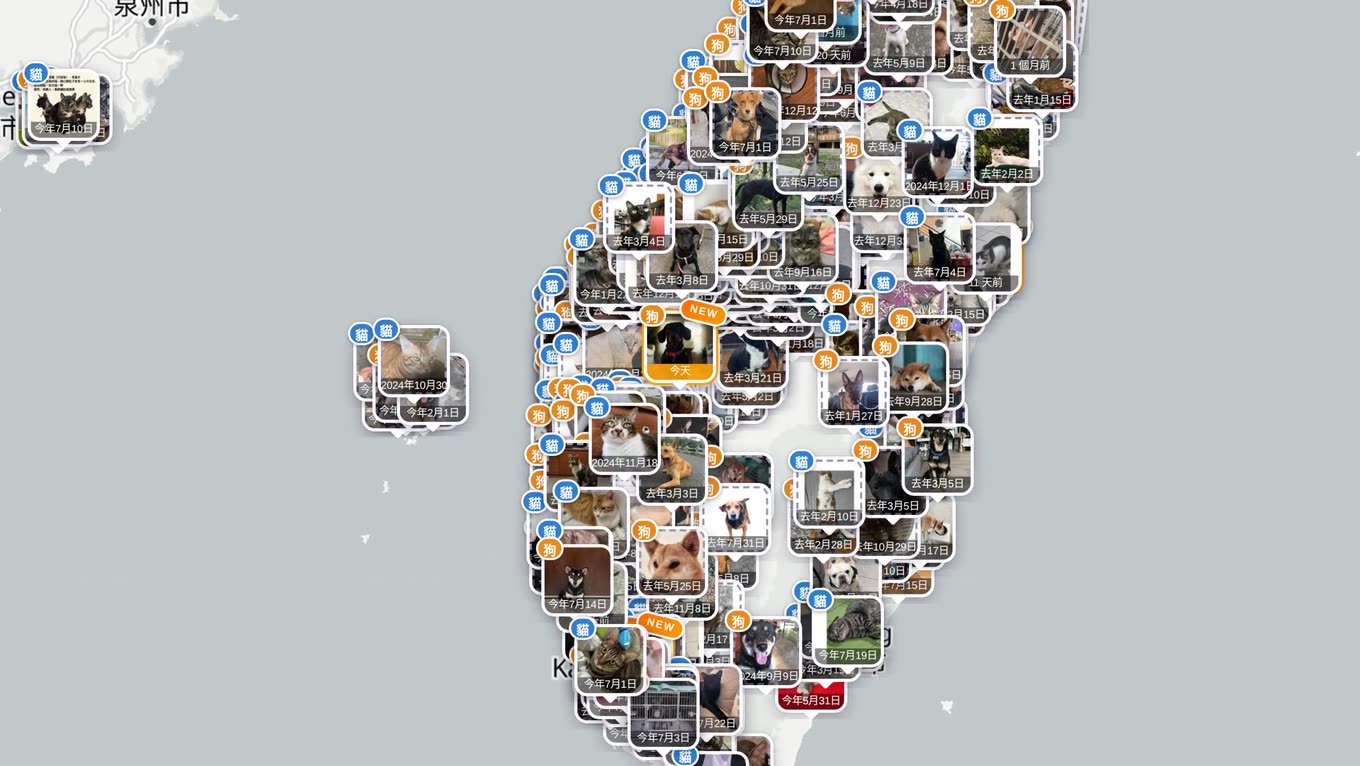
The structure is simple: a photo of a dog → the photo shrinks into a pin on the map → the map pulls back and cases appear → the whole of Taiwan → the pins fly out and arrange themselves into the site's cover.
The dog at the start is generated, and that needs saying first
The dachshund in the opening was generated by a local video model (MiniMax H3, on my own graphics card), and its "lost pet case" exists only inside the browser used for filming — a script inserted it into the map for the shoot, and the live site has no such record. The reason is simple: people use that site to look for real animals, and putting a fake case in it would be using their attention as a prop. The footage looks identical and the database stays clean.
Every other pin in the film is a real report on the map, and "more than eight thousand" is the figure from the official open data.
You cannot screen-record the map
The obvious approach is to have the browser animate the camera and record the screen. One test was enough to abandon it: at full density there are more than four hundred photo pins on screen, continuous zooming drops frames badly, and a twenty-second pull-back all but jumps past in the recording.
Instead, shoot stills and stitch: capture one base image at each of six zoom levels (1.68 levels apart, about 3.2× each), and compute the transitions from the Web Mercator projection — knowing each shot's centre and zoom level, you can work out which part of the next image the previous view occupies, then crop and scale between them exponentially, which gives a constant-speed pull-back. Six hundred frames, written out one at a time.
Pins have to be handled separately from the base map
The first version simply scaled up the whole screenshot, and the problem was spotted immediately: pins on the map are drawn at a fixed 68 pixels on screen and do not grow or shrink with the map. Scaling the whole screenshot made the pins swell and shrink, pulsing once per segment.
The fix is to separate the two: scale the base map as usual, capture the pins separately, convert each one's latitude and longitude to a screen position and paste it back at a fixed size, frame by frame. Now cases pop into view one by one as the map pulls back, and the pins never change size.
How the pins were captured was redone three times, every problem caught by a human eye:
- Cutting a pin out of the full screenshot — in dense areas the neighbours came along, so one sprite held three dogs
- Showing each pin alone and cutting it out by subtracting a pin-less shot — a pin's shadow is semi-transparent, so after subtraction the shadow ring took the street names underneath it into the sprite
- Finally: hide the map entirely during capture and make the page background transparent, which yields a PNG with real alpha, so a shadow is actually a shadow

The narration and the music are synthesised too
The narration is a Microsoft Taiwanese male voice (edge-tts) slowed by 8%, laid out line by line against the picture timeline. I meant to find free music and ended up synthesising it in code: a felted-piano arpeggio where every note has an attack and decay envelope. The first attempt used pure sine waves and sounded like telephone keypad tones; the envelope is what makes it read as an instrument.
It took seven versions
Seven cuts in all, and every problem was seen by a person rather than reported by the code: pins stitched with their neighbours, shadows dragging the base map along, sighting markers mixed into the sprites, the output only at SD, and a closing line of narration rewritten three times. AI can shoot the film, but "that bit is wrong" always comes from a human. That is probably the most honest division of labour in the whole thing.
The tool itself is at lazetool.com/lost-pet (in Chinese).